
CRM explained: what it is, what it does and who needs it
CRM stands for customer relationship management, and it gathers every contact with a customer in one record. This guide explains what the concept means and what it brings to your business. It also sums up the types and the selection criteria.
What is CRM?
CRM is short for “Customer Relationship Management”. The term describes two things at once. First, it is a way of working that puts the customer at the centre. Second, it is the software that supports that way of working.
As software, CRM joins customer details, conversations, quotes and tasks in a single record. As a result, everyone in the team sees the same customer with the same information.
What does CRM do?
In most businesses, customer information is scattered. Some sits in email, some on a phone, and some in a spreadsheet. A good system removes that mess. The concrete benefits are:
- One customer record: The answer to “who said what, and when” is on one screen.
- Follow-up discipline: The system creates tasks and reminders, so you do not forget opportunities.
- A visible sales process: You see at once which opportunity sits at which stage.
- Measurement: Reports also show which channel brings customers.
- Company memory: Even when an employee leaves, the customer history stays with you.
Core features
- Contact and company records
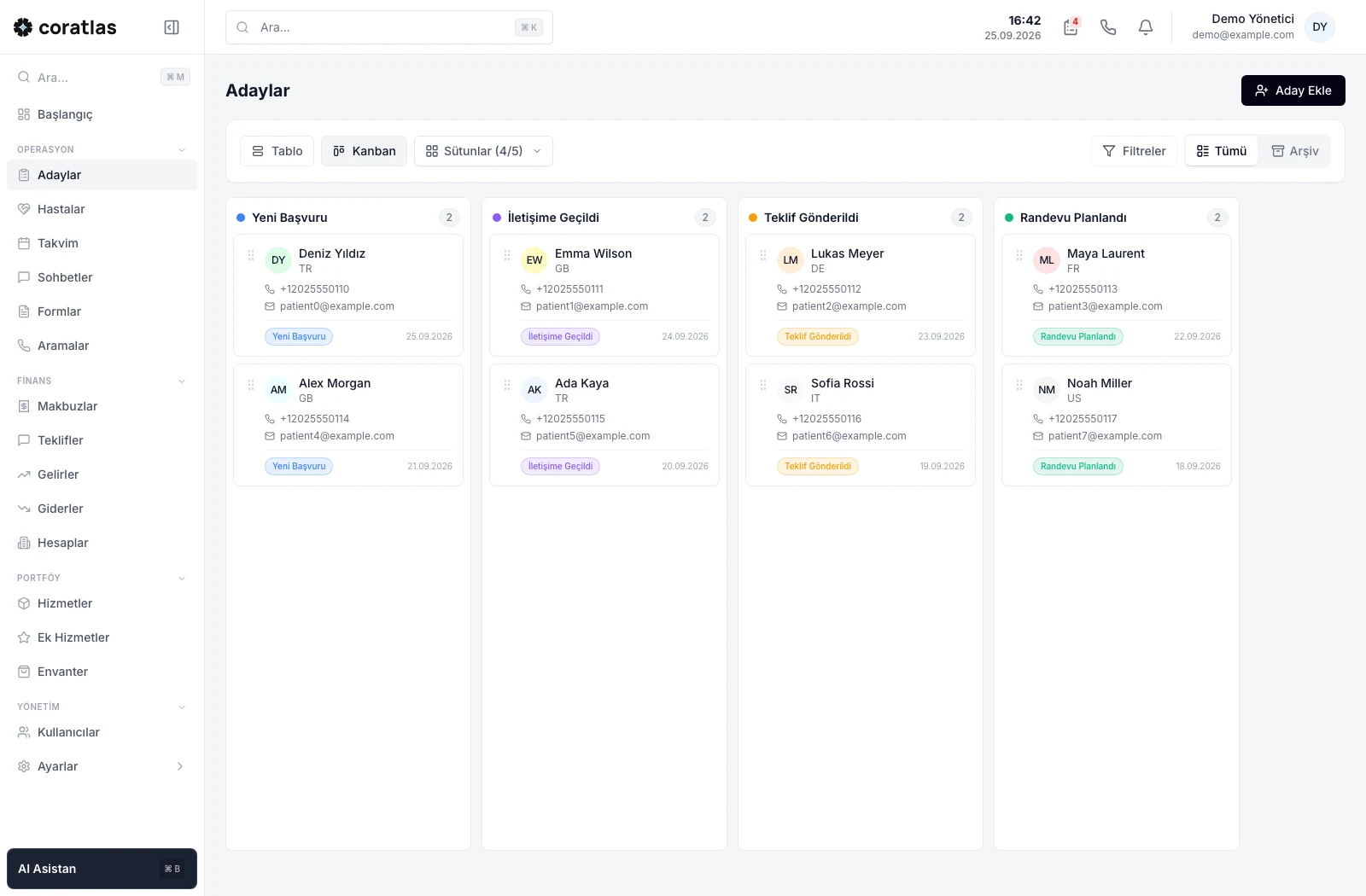
- Lead and opportunity management, often with a Kanban view
- Email, phone and WhatsApp contact history
- Tasks, calendar and reminders
- Quote and payment tracking
- Reports and dashboards
CRM types: operational, analytical and collaborative
Sources usually sort these systems into three groups. Operational ones run sales, marketing and support work day to day. Analytical ones, however, report on data and reveal trends. Collaborative ones make it easier to share information between teams.
Still, most current products offer all three functions in one package. So look at the fit with your workflow more than at the type.
General-purpose CRM or a sector-specific product?
General-purpose products address every sector. That flexibility is an advantage, but it leaves the setup work to you. You define the fields, the stages and the reports yourself.
Sector-specific products, on the other hand, bring the workflow with them. For example, a clinic manages patients, appointments and payment plans. An association, meanwhile, manages members, dues and announcements. Consequently, these organisations get value from a ready workflow sooner.
| Criterion | General-purpose | Sector-specific |
|---|---|---|
| Setup | You configure it yourself | Comes with a ready workflow |
| Flexibility | High | Limited to the sector |
| Terminology | Customer, opportunity | Patient, member, appointment |
| Best for | Standard sales teams | Processes of their own |
6 criteria for choosing a CRM
- Ease of use: If the team does not use it, even the best software is useless.
- Channels: Email, phone and WhatsApp should meet in the same record.
- Integration: Ask about ad forms, accounting and telephony connections.
- Pricing model: A per-user fee raises the cost as the team grows.
- Data security: Customer data is personal data, so permissions and backups are essential.
- Trial period: First test with your real data, then decide.
On personal data, European readers should start with GDPR. For Türkiye, the Personal Data Protection Authority publishes the relevant guidance.
How to roll out a CRM in 5 steps
- Write down the process: First list the stages a customer passes from first contact to sale.
- Clean the data: Then fix duplicate and incomplete records in your current sheets.
- Start small: After that, open the system to one team with a few core fields.
- Connect the channels: Add your email, phone and WhatsApp lines to the system.
- Measure and adjust: Finally, review the first month’s reports and simplify the stages.
The most common mistake is to define dozens of fields on day one. The team will not fill in long forms, so the system stays empty. Therefore start a CRM rollout with few fields. Then add new fields as the need appears.
Managers also need to use the system themselves. If you read the numbers from the CRM screen in meetings, the team picks up the habit of entering records too.
Which metrics show success?
Setting up the system is not enough; you also need to measure whether it works. For this reason, track these metrics from the first month:
- First response time: How many minutes pass before you answer a new lead?
- Conversion rate: What share of leads become customers?
- Stage duration: At which stage does an opportunity wait, and for how many days?
- Channel performance: Which ad or source brings more customers?
- Loss reason: Which reason comes up most in the opportunities you lose?
These metrics show where you lose time. For example, if the first response time is long, the problem lies in how the team splits work, not in the ads. Consequently, CRM is a decision tool as well as a record-keeping tool.
A sector example: health tourism
Coratlas Klinik is a sector-specific product we build for health tourism clinics. It captures leads from ad forms automatically. It also joins WhatsApp chats, calls, appointments and payments in the patient record. For details, see our clinic management software guide.
For associations, meanwhile, we offer Coratlas STK, which manages member relations. If ready-made products do not cover your need, we build a system of your own through our custom software development service.
Frequently asked questions
Which businesses is CRM suitable for?
It suits any business that talks to its customers regularly. The benefit shows quickly when more than one person deals with the same customer.
What is the difference between CRM and ERP?
CRM manages the relationship with the customer: leads, sales and support. ERP, however, manages internal resources: stock, production and finance. Therefore the two systems often work together.
Do we have to use CRM in place of Excel?
In small teams, Excel works for a while. However, once follow-ups slip and sheets multiply, it is time to switch.
How long does CRM setup take?
With sector-specific products, setup takes days. With general-purpose products, however, the time grows with the amount of configuration you need.